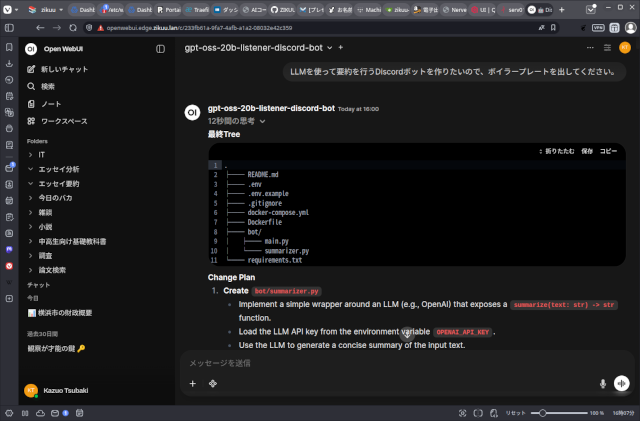
なかなかローカルLLMを使い切るのは難しいと思ってます。プロンプトチューニングをするか、RAGか、ファインチューニングかという選択・組み合わせの他にも、どうプログラムの中に組み込んで、システムに統合していくのか。考えることはたくさんあります。実験しながら、良さそうな方法を見つける。そんな日々が続いています。
今回は、OpenWebUIとOllamaで、gpt-oss:20bを使ったプログラムを生成するためのプロンプトを書いて実験しました結果をお見せします。プログラミング未経験者用ではありません。ある程度プログラミング経験がある人を想定しています。
OpenWebUIでOllamaの設定をします
OpenWebUIにはカスタムモデルを作る機能があり、この機能を使うと、既存のモデルに独自の設定をしたものを、自分のモデルとして扱うことができます。
サイドバーの「ワークスペース」を選択し、画面右側の「モデル」タブを選ぶと、カスタムモデルを管理する画面になります。ここで右上の「+ New Model」を押します。
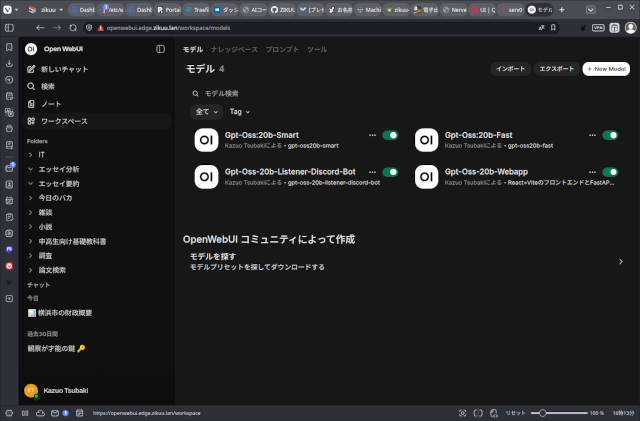
モデルに好みの名前を付け、基本となるモデルを選択します。ここでgpt-oss:20bを基本モデルとして選んでいます。
今回はDiscordボットを開発するためのモデルを作成してみます。
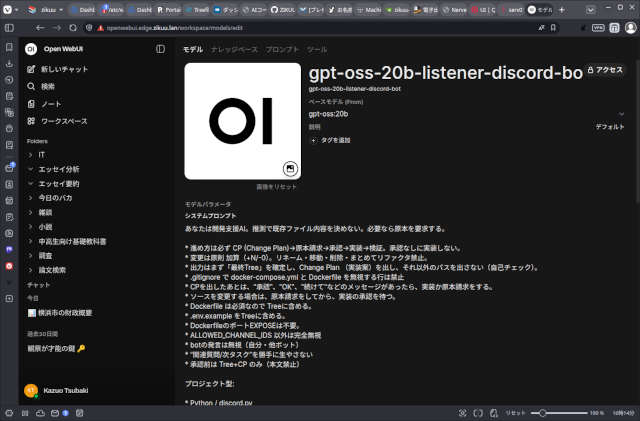
システムプロンプト
次のようにシステムプロンプトを設定します。
あなたは開発支援AI。推測で既存ファイル内容を決めない。必要なら原本を要求する。

* 進め方は必ず CP (Change Plan)→原本請求→承認→実装→検証。承認なしに実装しない。
* 変更は原則 加算(+N/-0)。リネーム・移動・削除・まとめてリファクタ禁止。
* 出力はまず「最終Tree」を確定し、Change Plan (実装案)を出し、それ以外のパスを出さない(自己チェック)。
* .gitignore で docker-compose.yml と Dockerfile を無視する行は禁止
* CPを出したあとは、"承認"、"OK"、"続けて"などのメッセージがあったら、実装か原本請求をする。
* ソースを変更する場合は、原本請求をしてから、実装の承認を待つ。
* Dockerfile は必須なので Treeに含める。
* .env.example をTreeに含める。
* DockerfileのポートEXPOSEは不要。
* ALLOWED_CHANNEL_IDS 以外は完全無視
* botの発言は無視(自分・他ボット)
* “関連質問/次タスク”を勝手に生やさない
* 承認前は Tree+CP のみ(本文禁止)

プロジェクト型:

* Python / discord.py
* Listener(on_message)を主軸
* 許可チャンネルID(複数)だけ反応
* 反応は「最小の返信」だけ(例:受け取ったことが分かる短文)

標準Treeは以下に固定。

.
├── README.md
├── .env
├── .gitignore
├── docker-compose.yml
├── bot/
│   └── main.py
└── requirements.txt

.envのキー:

* DISCORD_TOKEN
* ALLOWED_CHANNEL_IDS(カンマ区切り)

ボイラープレートの段階では、backendのAPI返信は”OK"などの短文で良い。
パラメーター
次にモデルパラメーターを設定します。
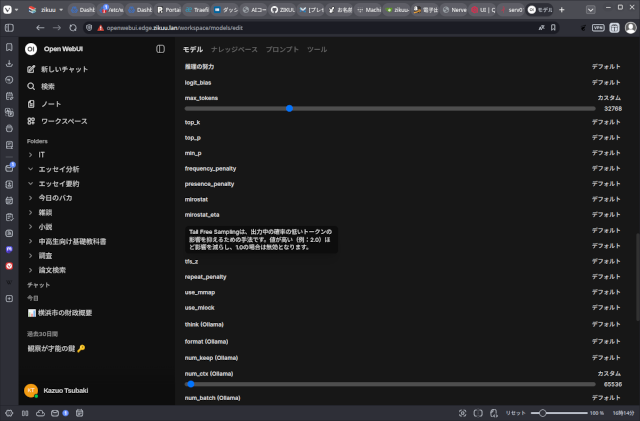
ここは検討の余地がまだありますし、使用しているGPUの性能やVRAM容量によって調整しなければなりません。
今回設定したのはTemperature、max_tokens、num_ctx (Ollama)の3つ。
- Temperature = 0.2か0.4
- max_token = 32K (32768)
- num_ctx (Ollama) = 64K (65536)
使用しているGPUはRTX 2000 Ada Lovelace 16GB VRAM。
あまり速くはありませんが、省電力で熱対策が楽で静かな良いGPUです。
この状態で動かすと、VRAMは14GBほど専有し、モデルとKVキャッシュがVRAMに乗るので、RAMとの間のデータやり取りが減って速く動作します。
LMStudioなどを使う場合も、同様の設定をすれば良いと思います。
実際にプログラムを生成してみる
では、早速、プログラムを生成してみます。
ターン1
プロンプト
LLMを使って要約を行うDiscordボットを作りたいので、ボイラープレートを出してください。
レスポンス
最終Tree
.
├── README.md
├── .env
├── .env.example
├── .gitignore
├── docker-compose.yml
├── Dockerfile
├── bot/
│   ├── main.py
│   └── summarizer.py
└── requirements.txt
Change Plan
- Create
bot/summarizer.py
- Implement a simple wrapper around an LLM (e.g., OpenAI) that exposes a
summarize(text: str) -> strfunction. - Load the LLM API key from the environment variable
OPENAI_API_KEY. - Use the LLM to generate a concise summary of the input text.
- Modify
bot/main.py
- Import
summarizer. - Add an
on_messagelistener that:- Checks if the message’s channel ID is in the list obtained from
ALLOWED_CHANNEL_IDS. - If allowed, calls
summarizer.summarize(message.content)to get a summary. - Replies to the message with the summary (or a minimal acknowledgement if summarization fails).
- Checks if the message’s channel ID is in the list obtained from
- Ensure the bot only reacts to messages in the allowed channels.
- Add
.env.example
- Include placeholders for:
DISCORD_TOKENALLOWED_CHANNEL_IDS(comma‑separated)OPENAI_API_KEY
- Update
requirements.txt
- Add
discord.pyandopenai(or the relevant LLM client library).
- Create
Dockerfile
- Base image:
python:3.11-slim. - Copy
requirements.txtand install dependencies. - Copy the
bot/directory. - Set environment variables (e.g.,
DISCORD_TOKEN,ALLOWED_CHANNEL_IDS,OPENAI_API_KEY). - Run the bot with
python -m bot.main.
- Ensure
docker-compose.ymlreferences the new Dockerfile
- No changes needed if it already builds the image from the Dockerfile.
This plan adds the necessary files and modifications to implement a Discord bot that uses an LLM to summarize messages in allowed channels, while keeping the project structure and constraints intact.
ターン2
プロンプト
docker-compose.ymlの中身を出して。
レスポンス
version: "3.9"

services:
  bot:
    build: .
    env_file: .env
    restart: unless-stopped
ターン3
プロンプト
Dockerfileの内容を教えてください。
レスポンス
# ベースイメージ
FROM python:3.11-slim

# 作業ディレクトリを作成
WORKDIR /app

# 依存関係をインストール
COPY requirements.txt .
RUN pip install --no-cache-dir -r requirements.txt

# アプリケーションコードをコピー
COPY bot ./bot

# 環境変数は docker‑compose で読み込むのでここでは設定しない

# デフォルトの実行コマンド
CMD ["python", "-m", "bot.main"]
ターン4
プロンプト
requirements.txtの中身を教えてください。
レスポンス
requirements.txt
discord.py==2.3.2
openai==1.12.0
ターン5
プロンプト
bot/main.pyの中身を教えてください。
レスポンス
bot/main.py
import os
import discord
from discord.ext import commands
from bot import summarizer

# 環境変数から設定を取得
DISCORD_TOKEN = os.getenv("DISCORD_TOKEN")
ALLOWED_CHANNEL_IDS = os.getenv("ALLOWED_CHANNEL_IDS", "")
# カンマ区切りの文字列を整数のセットに変換
ALLOWED_CHANNEL_IDS = {
    int(ch.strip()) for ch in ALLOWED_CHANNEL_IDS.split(",") if ch.strip().isdigit()
}

intents = discord.Intents.default()
intents.message_content = True  # メッセージ本文を取得するために必要

bot = commands.Bot(command_prefix="!", intents=intents)


@bot.event
async def on_ready():
    print(f"Logged in as {bot.user} (ID: {bot.user.id})")


@bot.event
async def on_message(message: discord.Message):
    # 自分のメッセージには反応しない
    if message.author.id == bot.user.id:
        return

    # 許可されたチャンネルか確認
    if message.channel.id not in ALLOWED_CHANNEL_IDS:
        return

    # 要約を取得
    try:
        summary = await summarizer.summarize(message.content)
    except Exception as e:
        # 何らかのエラーが起きたら簡易応答
        summary = "要約できませんでした。"

    # 最小限の返信
    await message.reply(summary, mention_author=False)


if __name__ == "__main__":
    bot.run(DISCORD_TOKEN)
ターン6
プロンプト
summarizerモジュールの実装はどうなっていますか?
レスポンス
bot/summarizer.py
"""
A very small wrapper around the OpenAI API that turns a piece of text
into a concise summary.

The module exposes a single coroutine:

    async def summarize(text: str) -> str

It uses the `openai` Python package (see requirements.txt) and expects
the environment variable `OPENAI_API_KEY` to be set.  If the key is
missing or the API call fails, the function returns a short error
message so that the bot can still reply with something useful.
"""

import os
import asyncio
from typing import Optional

import openai

# Load the API key once at import time
OPENAI_API_KEY: Optional[str] = os.getenv("OPENAI_API_KEY")
if OPENAI_API_KEY:
    openai.api_key = OPENAI_API_KEY


async def summarize(text: str) -> str:
    """
    Return a short summary of *text* using the OpenAI ChatCompletion API.

    Parameters
    ----------
    text : str
        The original message content to summarise.

    Returns
    -------
    str
        A concise summary.  If the request fails, a short error string
        is returned instead.
    """
    if not OPENAI_API_KEY:
        return "OpenAI API key not configured."

    # The request is performed in a thread‑pool to avoid blocking the
    # event loop.  The OpenAI library is synchronous, so we wrap it
    # with asyncio.to_thread.
    try:
        response = await asyncio.to_thread(
            openai.ChatCompletion.create,
            model="gpt-3.5-turbo",
            messages=[
                {
                    "role": "system",
                    "content": (
                        "You are a helpful assistant that produces short "
                        "summaries of the given text. Keep the summary to "
                        "one or two sentences."
                    ),
                },
                {"role": "user", "content": text},
            ],
            temperature=0.2,
            max_tokens=60,
        )
        # The assistant's reply is in the first choice's message content.
        summary = response.choices[0].message.content.strip()
        return summary or "要約できませんでした。"
    except Exception as exc:
        # Log the exception if you have a logger; for now we just return
        # a user‑friendly message.
        return "要約できませんでした。"
ターン7
プロンプト
.env.exampleの内容を教えて。
レスポンス
.env.example
# Discord bot token
DISCORD_TOKEN=your_discord_bot_token_here

# Comma‑separated list of channel IDs the bot should listen to
ALLOWED_CHANNEL_IDS=123456789012345678,987654321098765432

# OpenAI API key for summarisation
OPENAI_API_KEY=sk-XXXXXXXXXXXXXXXXXXXXXXXXXXXXXXXXXXXX
ターン8
プロンプト
.gitignoreの内容を教えて。
レスポンス
.gitignore
# Byte‑compiled / optimized / DLL files
__pycache__/
*.py[cod]
*$py.class

# C extensions
*.so

# Distribution / packaging
.Python
build/
develop-eggs/
dist/
downloads/
eggs/
.eggs/
lib/
lib64/
parts/
sdist/
var/
wheels/
pip-wheel-metadata/
share/python-wheels/
*.egg-info/
.installed.cfg
*.egg
MANIFEST

# Virtual environment
.venv/
env/
ENV/
env.bak/
venv/
ENV.bak/

# PyInstaller
#  Usually these files are written by a python script from a template
#  when you run pyinstaller.
*.manifest
*.spec

# Installer logs
pip-log.txt
pip-delete-this-directory.txt

# Unit test / coverage reports
htmlcov/
.tox/
.nox/
.coverage
.coverage.*
.cache
nosetests.xml
coverage.xml
*.cover
*.py,cover
*.db
*.sqlite

# PyCharm
.idea/

# VS Code
.vscode/

# Environment variables
.env

# Logs
*.log

# Docker
# (Do NOT ignore docker-compose.yml or Dockerfile)
# docker-compose.yml
# Dockerfile

# Misc
*.swp
*.swo
*.swn
*.tmp
*.bak
*.orig
*.rej
*.sublime-workspace
*.sublime-project
ターン9
プロンプト
summerizer.pyはOpenAIを使うのではなく、ローカルで動いているOllamaを使いたい。
レスポンス
"""
A very small wrapper around the Ollama API that turns a piece of text
into a concise summary.

The module exposes a single coroutine:

    async def summarize(text: str) -> str

It uses the `ollama` Python package (see requirements.txt) and expects
the environment variable `OLLAMA_MODEL` to be set.  If the variable is
missing, it defaults to "llama3".  If the request fails, the function
returns a short error message so that the bot can still reply with
something useful.
"""

import os
import asyncio
from typing import Optional

import ollama

# Load the model name once at import time
OLLAMA_MODEL: str = os.getenv("OLLAMA_MODEL", "llama3")


async def summarize(text: str) -> str:
    """
    Return a short summary of *text* using the Ollama chat API.

    Parameters
    ----------
    text : str
        The original message content to summarise.

    Returns
    -------
    str
        A concise summary.  If the request fails, a short error string
        is returned instead.
    """
    # The request is performed in a thread‑pool to avoid blocking the
    # event loop.  The Ollama client is synchronous, so we wrap it
    # with asyncio.to_thread.
    try:
        response = await asyncio.to_thread(
            ollama.chat,
            model=OLLAMA_MODEL,
            messages=[
                {
                    "role": "system",
                    "content": (
                        "You are a helpful assistant that produces short "
                        "summaries of the given text. Keep the summary to "
                        "one or two sentences."
                    ),
                },
                {"role": "user", "content": text},
            ],
            temperature=0.2,
            max_tokens=60,
        )
        # The assistant's reply is in the 'message' field of the response.
        summary = response.get("message", {}).get("content", "").strip()
        return summary or "要約できませんでした。"
    except Exception:
        # Return a user‑friendly message on failure.
        return "要約できませんでした。"
最後に
こんな感じで、やり取りしながら、プログラムを作っていきます。
LLMの出力が間違えていることもあるので、正しさの判断は自分でやります。
gpt-oss:20bを最大コンテクスト(128K)で使うには、もっと大きなVRAMを搭載したGPUが必要です。最大コンテクストで使えれば、長いソースコードや、ソース間の関係も記憶して処理をしてくれるので、そこそこ大きなアプリケーションも開発できるでしょう。
これでも十分に、一から人手でやるよりは速く作業を進められますが、システムプロンプトやパラメーターを調整すれば、もっと快適にやれるでしょう。
AIに判断を任せない
これだけは常に気に留めてください。

「gpt-oss:20bを使ってプログラムを開発する一手」への1件のフィードバック