OpenStep APIに極力準拠してZIKUUのSwiftフレームワーク。
X11で描画できるところまできました。
今日、実装したのは、NSGeometry、NSAffineTransform、NSBezierPath、GraphicsContext、レンダリングの仕組みなどで、これらは論理的にOpenStep API互換です。
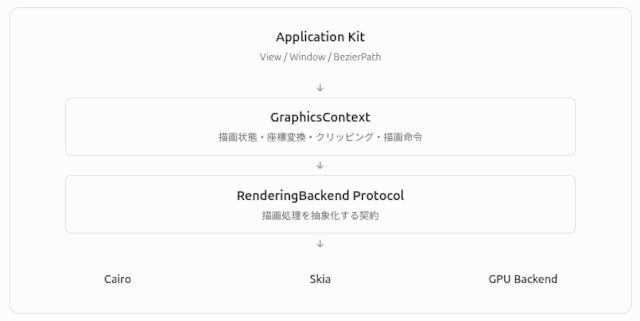
この図のような構造になっています。
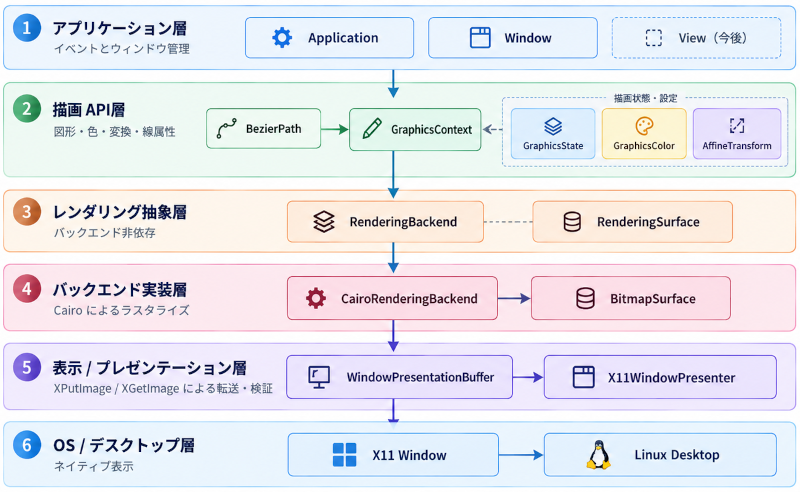
レンダリングとバックエンドを抽象化した仕組みの上に、X11に対応したPresenterを載せた構造です。Window上の描画は、これらの上で実行されます。
X11WindowPresenterの位置に、WaylandやGPUレンダリングに対応したものを追加すれば、Linux上の描画環境が完成します。
この段階で次のようなサンプルコードを実行。
import Foundation
import Core
import Application
import CairoBackend
import X11Backend

import class Application.Window

@main
struct ZIKUUDrawingDemo {
    static func main() {
        let width = 640
        let height = 480

        guard let surface = BitmapSurface(
            width: width,
            height: height,
            pixelFormat: .bgra8
        ) else {
            print("Could not allocate BitmapSurface")
            return
        }

        guard let backend = CairoRenderingBackend(surface: surface) else {
            print("Could not initialize CairoRenderingBackend")
            return
        }

        let context = GraphicsContext(backend: backend)
        backend.clear(to: GraphicsColor(red: 0.12, green: 0.14, blue: 0.19))

        let panel = BezierPath()
        panel.appendRect(Rect(x: 80, y: 80, width: 480, height: 320))

        let accent = BezierPath()
        accent.appendRect(Rect(x: 120, y: 125, width: 400, height: 70))

        let tile = BezierPath()
        tile.appendRect(Rect(x: 120, y: 225, width: 175, height: 125))

        context.beginDrawing()
        context.setFillColor(GraphicsColor(red: 0.90, green: 0.91, blue: 0.88))
        context.fill(panel)
        context.setFillColor(GraphicsColor(red: 0.12, green: 0.43, blue: 0.76))
        context.fill(accent)
        context.setFillColor(GraphicsColor(red: 0.88, green: 0.39, blue: 0.22))
        context.fill(tile)
        context.endDrawing()
        backend.flush()

        guard let buffer = WindowPresentationBuffer(surface: surface) else {
            print("Could not acquire presentation buffer")
            return
        }

        let presenter = X11WindowPresenter(
            window: Window(),
            width: width,
            height: height
        )

        guard presenter.attach(), presenter.show() else {
            print("Could not open an X11 window (check DISPLAY)")
            return
        }
        defer { presenter.detach() }

        Thread.sleep(forTimeInterval: 0.1)
        while !presenter.closeRequested && presenter.isValid {
            presenter.processEvents()
            if presenter.drawableWidth == width && presenter.drawableHeight == height {
                _ = presenter.present(buffer)
            }
            Thread.sleep(forTimeInterval: 1.0 / 30.0)
        }
    }
}
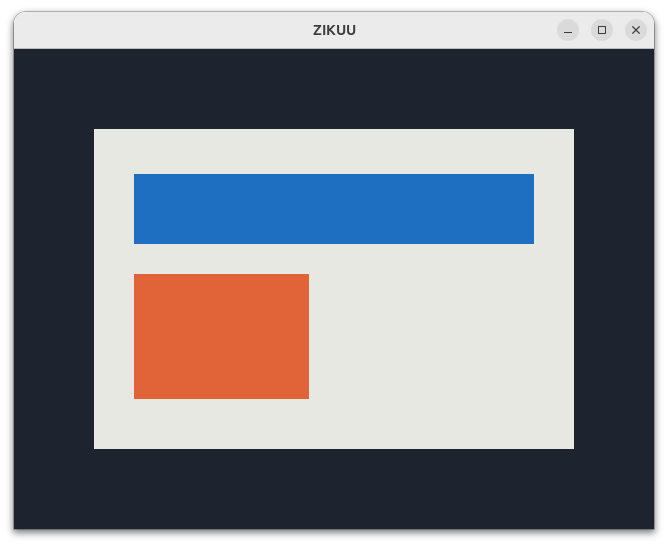
実行結果がこれです。
ここまででイベント処理、Responderチェーン、グラフィックス処理が実装できたので、WaylandやGPUレンダリングに対応してから、NSView相当とそのサブクラスの実装に入ることになります。
FoundationはSwift Foundationを利用するので、AppKit的なフレームワークが完成すれば、普通にLinux用デスクトップアプリが書けるようになります。
元々、NeXTSTEP -> OPENSTEP -> MacOS (OPENSTEP on Macintosh) という流れの中で、AppKitが(Appleの下で)Application Kitになりました。iOSもApplication Kitのモバイル対応フレームワークを使っています。
これは、それとは別に、OpenStep -> ZIKUU Framework (OpenStep on Linux written in Swift) のような道を作っているという話です。
OpenStepに(完全ではありませんが)対応したフレームワークなので、iOSアプリをSwiftで書いていた人なら、Linuxデスクトップアプリを書きやすいと思います。

「Swiftフレームワーク – 描画」への1件のフィードバック